100% Secure & Client-Side
This tool uses advanced Web Workers to process OCR entirely within your browser. Your images and financial data are never uploaded to our servers, ensuring maximum privacy and compliance.
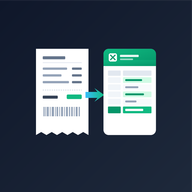
Scan receipts or batch upload images to instantly build an expense tracking spreadsheet. 100% private in-browser OCR, no signup, and instant Excel download.
Drag and drop a single receipt or multiple images to process them instantly in your browser.
This tool uses advanced Web Workers to process OCR entirely within your browser. Your images and financial data are never uploaded to our servers, ensuring maximum privacy and compliance.
Simply drag and drop or upload your receipt images (JPG, PNG, WebP). The tool uses client-side OCR (Optical Character Recognition) to automatically detect merchant names, dates, tax amounts, payment methods, and totals, then formats everything into a clean Microsoft Excel (.xlsx) file.
Yes, our Receipt-to-Excel batch scanner is 100% free to use. There are no subscriptions, no monthly scanning limits, and no account signup required. You can scan single receipts or entire batches anytime.
Yes, 100%. All OCR processing and spreadsheet generation happens locally in your browser using client-side Web Workers. Your images and confidential financial figures never leave your device and are never uploaded to any remote server.
The tool generates a professional, dual-tab `.xlsx` workbook. Tab 1 is an Expense Dashboard featuring visual KPI totals and tax breakdowns, while Tab 2 provides an itemized Receipt Data Log ready for accounting software, bookkeeping, or IRS tax filing.
Yes! If you need to create custom proof of payment for your customers, use our Free Receipt Generator. If you need to bill clients before receiving payment, check out our Free Invoice Generator.
We constantly seek to improve our tools. If you faced a bug, an incorrect calculation, or have a feature request, please let us know! Send us an email and we will review and reply within 48 hours.
mail Contact Support